Remember the little things. Cherish the people who matter.
Say it, share it, or snap it. The AI on your iPhone reads what you saved — voice notes, photos, links, documents — and keeps the details that matter next to the person they belong to. Nothing is sent anywhere to be understood.
✧ Apple Intelligence, on your iPhone On your device by default, no analytics
A SMALL SPACE FOR YOUR CLOSEST PEOPLE
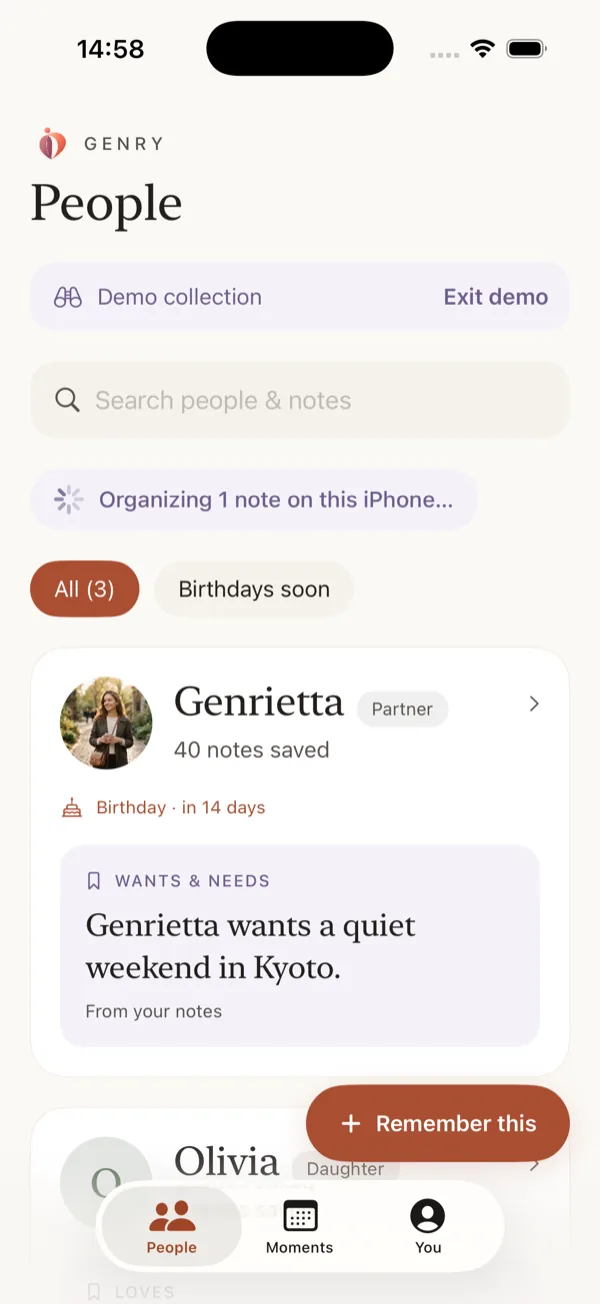
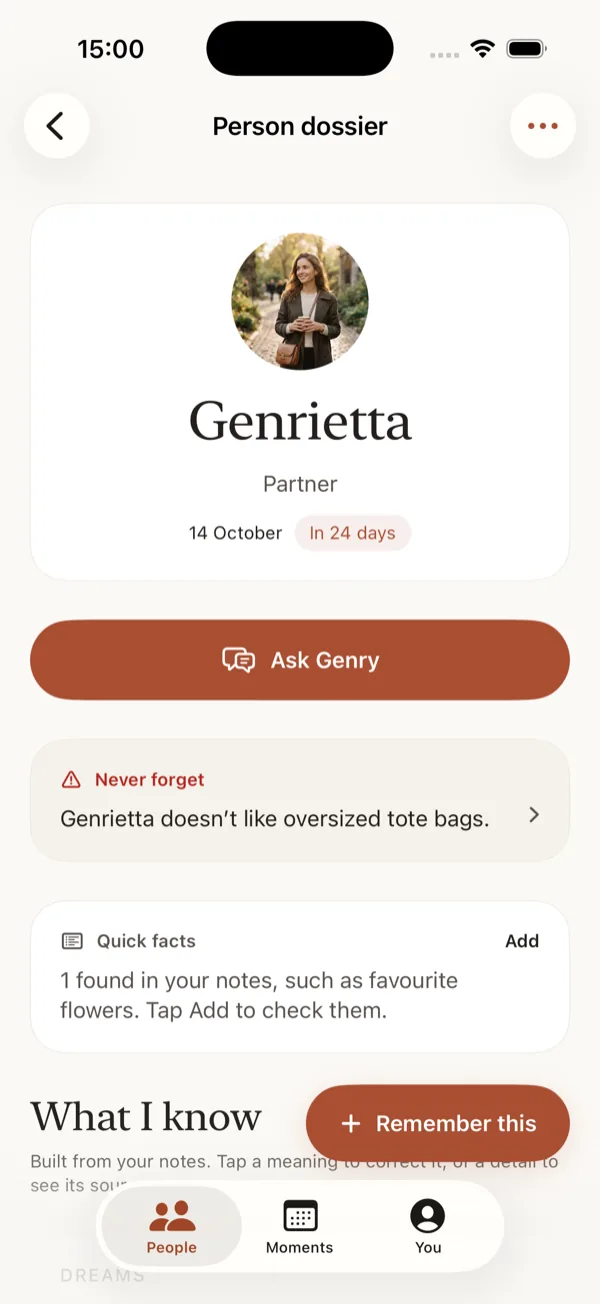
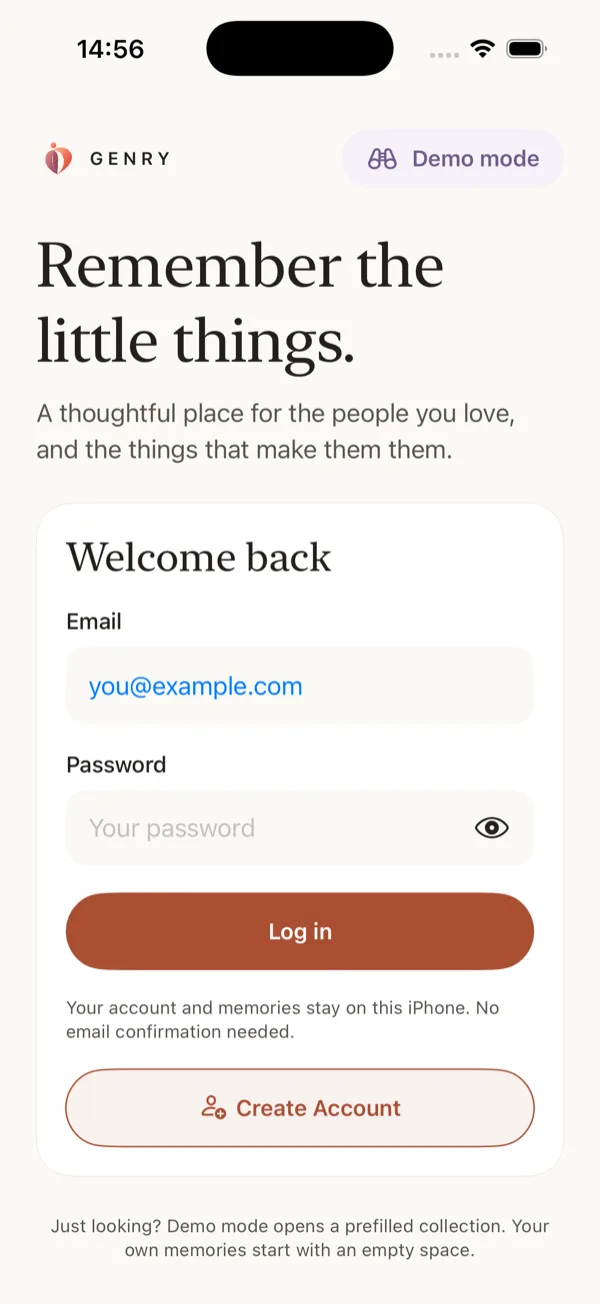
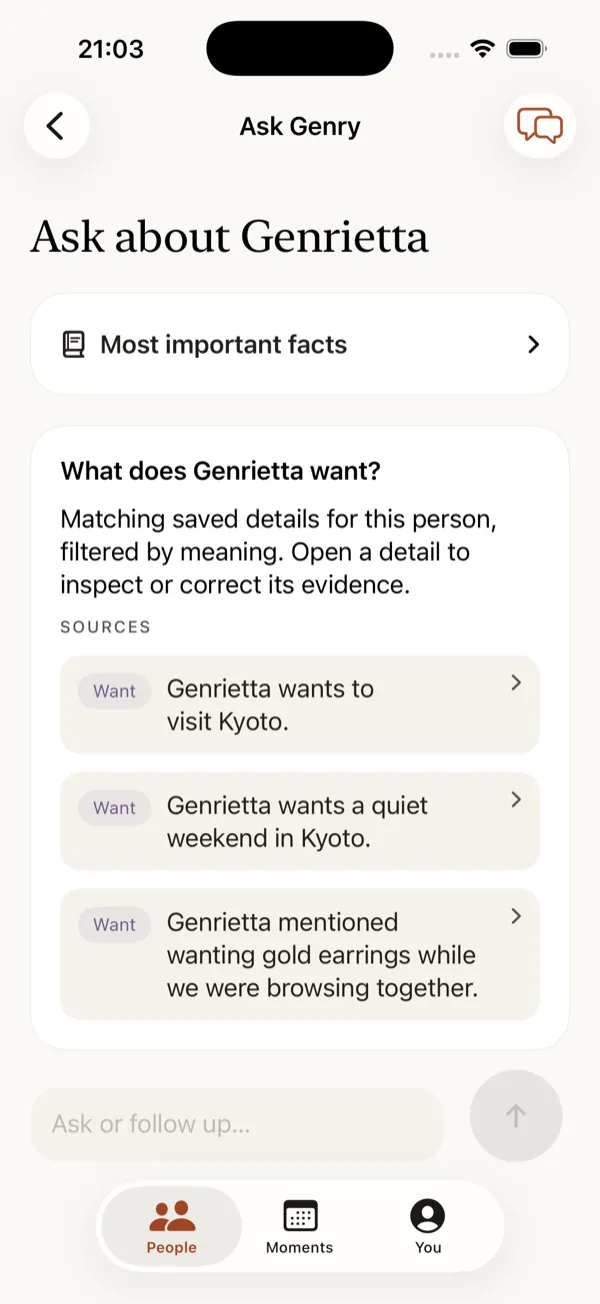
A real screen from the app · Demo collection, not real people
✧ WHAT THE AI ACTUALLY DOES
An intelligence that never leaves your iPhone.
Genry is built for the Apple Intelligence personal intelligence system. The language model runs on your phone, so the understanding happens where the memories already are.
01✧
It reads what you save.
A voice note after dinner, a screenshot, a link, a PDF. Genry transcribes speech, reads the text inside images and documents, and pulls out the details worth keeping — a favorite, a wish, a date, a thing they said once.
✧ FROM A VOICE NOTE
“Anna loved those fig candles…” → saved as something she likes.
02▣
It shows its work.
Every detail the AI learns quotes the note it came from, and says whether you stated it or Genry inferred it. Tap through to the original, correct it, or delete it — and the conclusions that rested on it go too.
EVIDENCE, NOT GUESSWORK
Ask Genry a question about someone and the answer is drawn from your own notes.
03⌑
It never phones home.
No cloud model reads your memories unless you choose one. Nothing is used to train anything. There is no analytics in the app. If Apple Intelligence is unavailable, your notes are still saved, searchable and readable — the AI simply waits.
WHAT LEAVES THE DEVICE
Nothing, unless you create a cloud account and switch it on yourself.
EVERYTHING IN VERSION 1
What Genry does, in full.
Every feature below runs on your iPhone, with or without a cloud account.
♩
Capture anything
Voice notes you start yourself, transcribed on the device
Text, web links, photos and camera shots
PDF, Word, RTF and plain text documents
Audio files and notes about places
Share Sheet: send to Genry from any app
Siri Shortcut and Action Button capture
Home and Lock Screen widget for one-tap saving
✧
Understand, on device
Apple Intelligence extracts details, quoting your own words
Text recognition reads photos, screenshots and scans
PDF and Word documents are read and made searchable
Speech transcription without a server
Stated and inferred details are labelled differently
Related memories group together as they accumulate
Review, confirm or correct anything Genry learns
⌕
Find it again
Search names, notes, filenames and learned details
Search inside recognized document and image text
Ask Genry a question, answered from your saved notes
Every answer links back to its original source
Filter to the birthdays coming up soon
A dossier per person, with the full timeline underneath
♧
Show up on time
Birthdays and custom moments, repeating each year
Opt-in reminders, normally the morning before
Reminders carry no names and no details on your Lock Screen
Gift ideas drawn only from things they actually liked
Known dislikes are never suggested
⌑
Keep it yours
Start with a local profile — no account, no email
Lock Genry behind Face ID, Touch ID or your passcode
Export one password-protected file with everything in it
Restore that file onto another iPhone
Delete a detail, all private content, or the whole account
Optional cloud sync, off until you choose it
No analytics, no ads, no training on your memories
▣
Look around first
Demo mode opens a prefilled collection of sample people
Kept completely separate from your real one
Switch back and forth whenever you like
Works without Apple Intelligence, so you can try it anywhere
REAL SCREENS FROM THE APP
On your iPhone, and nowhere else.
Captured from Genry running on iOS 26, using the built-in Demo collection. The people shown are sample data, not real people.
✧ WHAT THE AI LEARNED
Details, with their sources attached.
Ask a question, or read what Genry drew from your notes — each detail still linked to the note behind it.
NO ACCOUNT NEEDED
Start without the cloud.
A local account lives on the iPhone, with no email to confirm. Demo mode opens a prefilled collection to look around first.
✧ ASK, AND IT ANSWERS
Ask about someone.
What do they want? What did they mention? Every answer lists the saved notes it came from, ready to open.
A SMALL HABIT OF CARE
From a passing detail to a thoughtful moment.
01
Choose your person.
A partner, your dad, your oldest friend. Make a little space for each person you want to remember well.
02
Collect the little things.
Save what they mention, love, or hope to do. Review learned details alongside the original notes that support them.
03
Show up thoughtfully.
Find a detail before you meet. Revisit gift ideas. Set a reminder for a birthday or a moment that matters.
PEOPLE ARE WORTH REMEMBERING
You don’t need to remember everything. Just the things that mean something.
For partners, parents, friends, and all the people who make your world feel like yours.
A scattered notes habit compared with Genry’s approach
A SCATTERED NOTES HABIT
GENRY RELATIONAL COMPANION
Personal details mixed in with grocery lists and everyday tasks.
Dedicated person profiles for the people you love.
Searching through old notes when an important date arrives.
Saved occasions and optional reminders to help you prepare.
Privacy depends on the notes service and its sync settings.
Local profiles and on-device AI, with cloud sync only if you choose it.
Manually copying, labeling, and sorting each new detail.
Capture notes, voice, and shared content with their original sources.
✎
“The moment worth designing for is small: someone mentions something once, in passing, and a year later you remember it.”
Why we are building GenryGenry has not been released yet, so there are no user reviews to show. This is what we are aiming at.
PERSONAL MEANS PERSONAL
Close to your heart. At home on your iPhone.
Your relationships deserve a private space. Genry starts with a local profile, and processes memories on your device.
✓
On-device intelligence
Memory extraction uses Apple Intelligence on a compatible iPhone. Saved details stay available even when the model isn’t.
✓
Cloud sync is your choice
Local profiles stay on your device. Optional cloud accounts sync through Supabase; this is not end-to-end encrypted storage. With an account you can also choose a larger cloud model, or connect ChatGPT or Claude — each a separate choice, each explained in the privacy policy.
✓
Your memories, with their sources
Review, correct, and delete saved details. Return to the original note instead of taking an AI interpretation on trust.
✓
Locked behind Face ID
Turn on an unlock requirement and Genry stays closed until you authenticate with Face ID, Touch ID, or your passcode.
✓
A backup file you keep
Export everything — people, notes, details, and originals — as one file protected by a password only you know. Restore it on a new iPhone. We cannot recover that password.
✓
Leaving is simple
Delete individual details, erase all private content while keeping your login, or delete the account outright from inside the app.
THOUGHTFUL BY DESIGN
Care is personal. So is your memory.
Default storageOn your device
AI processingOn your device
Cloud syncOptional
No analytics in the app. No cloud AI unless you choose it. No third-party requests on this website. Your choice to connect, always.
COMING SOON FOR IPHONE
Begin remembering with intention.
A little space for the people who make your world meaningful.
Explore Genry ↓iOS 26+ · AI features require a compatible iPhone with Apple Intelligence enabled.
Genry
People are worth remembering.
PENDING RELEASE
A FEW LITTLE DETAILS
Before you begin.
Can I download Genry yet?
Not yet. Genry is finished and waiting to be published. The App Store link will appear here on release.
Do I need Apple Intelligence?
You can save, view, and search captured content without it. AI memory extraction needs a compatible iPhone running iOS 26 or later, with Apple Intelligence enabled and its models downloaded. AI-generated details can be imperfect, so Genry lets you review and correct them.
Does Genry need a cloud account?
No. You can start with a local profile. Cloud sign-in and sync are optional. Local data is excluded from device backups, so unsynced memories can be lost if you lose your phone or delete the app.
Does it listen to conversations in the background?
No. Voice capture is intentional: you start recording in the app. Genry’s in-app recording stops after 60 seconds or when the app leaves the foreground.
Can I get my memories out again?
Yes. Export everything as a single file — people, notes, learned details, and original photos and documents — protected by a password you choose. The same file restores onto another iPhone. Keep the password safe: Genry cannot recover it.
Can I lock the app?
Yes. Turn on the unlock requirement and Genry asks for Face ID, Touch ID, or your passcode before it opens.
What does this website collect?
Nothing. There is no analytics, no tracking, no cookie banner because there are no cookies, and no third-party requests — the fonts are served from this site rather than from Google. The one exception is the sign-in page you reach only when connecting Genry to an assistant. See the privacy approach.